
Kia EV6: Controls and features / Audio system
Contents:
- Over-The-Air software update: (if equipped)
- Sharkfin antenna
- USB port
- Using the infotainment system or climate switchable controller
NOTE
-
If aftermarket HID headlamps are installed on the Kia EV6, interference may occur with the audio system or electronic components.
-
Applying metallic window tint film to the Kia EV6 glass may affect radio reception, connected vehicle services, wireless communication features, and automatic headlamp operation. Additionally, chemicals used during tint installation may penetrate interior electronic components and potentially cause malfunction.
If your Kia EV6 is equipped with a multimedia or infotainment system, refer to the separately supplied multimedia manual for detailed operating information.
Over-The-Air software update: (if equipped) ➤
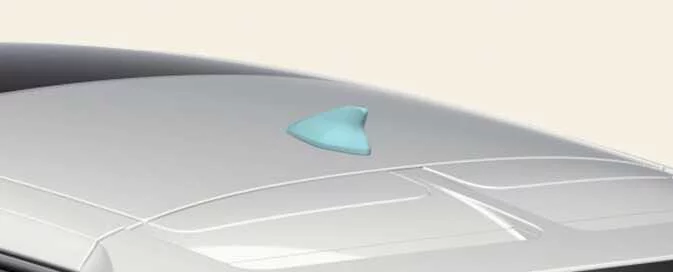
Sharkfin antenna
|
The Kia EV6 sharkfin antenna transmits and receives various wireless communication signals, including AM/FM radio, GPS navigation, and additional connectivity signals depending on vehicle equipment and options.
NOTE
-
To prevent Kia EV6 antenna damage, always check vehicle height before entering low-clearance areas such as automated parking garages or automatic vehicle wash systems.
-
Exercise caution when loading cargo onto the Kia EV6 roof rack to avoid striking the sharkfin antenna. Antenna damage may reduce wireless communication and signal reception performance.
USB port
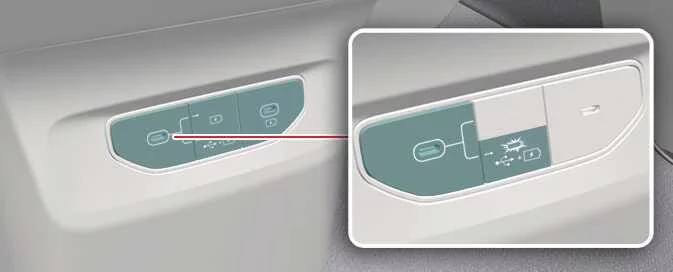
The Kia EV6 USB port allows connection of compatible USB devices for multimedia playback, smartphone connectivity, and data transfer functions.
|
Use only compatible USB storage devices and certified connection cables with the Kia EV6 infotainment system for reliable performance and stable data transfer.
Using the infotainment system or climate switchable controller

|
The Kia EV6 switchable controller allows the same touch-sensitive panel to operate either the infotainment system controls or the climate control functions.
Press the switchable controller button to change between the Kia EV6 infotainment control panel and climate control panel.
Press and hold the controller button to set the preferred default Kia EV6 control panel mode.


Other information:
Kia EV6 2022-2026 Owner's Manual: Manual type
To adjust the steering wheel angle, pull the lock release lever (1) downward. Adjust the steering wheel to the preferred angle (2) and move it forward or backward (3) to achieve the ideal driving position. Pull the lock-release lever (1) upward to securely lock the steering wheel into place. Always confirm that the steering wheel is securely locked in the desired position before driving the Kia EV6.Kia EV6 2022-2026 Owner's Manual: Front seat adjustment for manual seat: (if equipped)
Forward/backward seat adjustment Seat cushion height adjustment Seatback recline angle adjustment Use the manual adjustment levers located on the outer side of the Kia EV6 seat cushion to adjust the front seat position. Proper seat adjustment improves driving comfort, visibility, and control of the Kia EV6 steering wheel, pedals, and dashboard controls.
Contents
- Over-The-Air software update: (if equipped)
- Sharkfin antenna
- USB port
- Using the infotainment system or climate switchable controller
Categories
- Manuals Home
- Kia EV6 Owners Manual
- Questions & Answers
- Video Guides
- Useful Resources
- New on site
- Most important about Kia EV6
- Privacy Policy
