
Kia EV6: Electric vehicle guide / Charge indicator light for electric vehicle
Kia EV6 2022-2026 Owner's Manual / Electric vehicle guide / Charge indicator light for electric vehicle
Contents:
Charging status
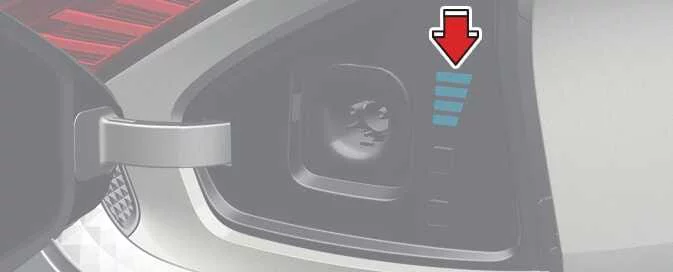
While charging the Kia EV6 high-voltage battery, the battery charge level can be monitored from outside the vehicle using the external charging indicator lights.
|
|
Lamp status |
Battery SOC [%] |
|---|---|

|
0–24 |

|
25–49 |

|
50–74 |

|
75–100 |
During charging, the indicator lamps on the Kia EV6 blink according to the current battery State of Charge (SOC).
If charging fails or a charging error occurs, the charging indicator light blinks red to notify the driver of a charging system issue.
The Kia EV6 charge indicator lamps are located at the rear of the vehicle inside the charging door assembly.


Other information:
Kia EV6 2022-2026 Owner's Manual: Charging wireless smart phone
Remove all objects from the Kia EV6 wireless charging pad, including the smart key and metallic accessories. Foreign objects may interfere with charging operation or cause overheating. Position the smartphone in the center of the Kia EV6 charging pad. When charging begins, the Kia EV6 charging indicator changes to orange.When the left or right turn signal is activated, the Kia EV6 Blind-Spot View Monitor image appears on the instrument cluster display. The Kia EV6 Blind-Spot View Monitor system operates while the vehicle is moving and the turn signal is active. Non-operating conditions The Kia EV6 Blind-Spot View Monitor system turns OFF under one of the following conditions: When the turn signal is switched OFF.
Contents
Categories
- Manuals Home
- Kia EV6 Owners Manual
- Questions & Answers
- Video Guides
- Useful Resources
- New on site
- Most important about Kia EV6
- Privacy Policy

Copyright © 2026 Kia EV6 Manuals � 0.0075