
Kia EV6: Electric vehicle guide / Charging door operation
Contents:
-
Push the charging door gently to open the Kia EV6 charging inlet compartment.
-
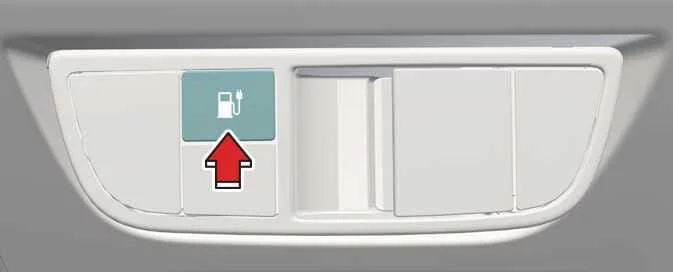
Press the charging door open/close button or manually close the charging door securely after charging is completed.
|
Charging door operation
-
Press the charging door open/close button located inside the Kia EV6 cabin to operate the charging door electronically.
Precautions for charging the electric vehicle ➤
Immediately stop charging
To stop charging immediately while using an AC charger or DC charger with the Kia EV6, follow the procedure below.
|
-
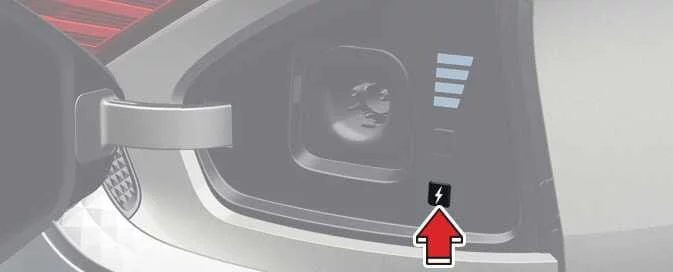
Charging button
-
Touch the door lock sensor on the exterior Kia EV6 door handle or press the unlock button on the smart key to unlock the vehicle doors.
-
Within approximately 15 seconds after unlocking the Kia EV6 doors, press and hold the charging button located on the charging door for about 2 seconds.
AC charge ➤
DC charge ➤


Other information:
Kia EV6 (CV/CV1A) 2022-2026 Owner's Manual: How to register Digital Key 2 (card key)
To activate the Kia EV6 Digital Key 2 card key feature, register the NFC card key through the vehicle system by following the registration steps below. Enter the Kia EV6 with both registered smart keys available inside the vehicle. Confirm that the Use menu is enabled. With the vehicle powered on, select Setup > Vehicle > Digital Keys > NFC Card key > Use on the infotainment display.Kia EV6 (CV/CV1A) 2022-2026 Owner's Manual: Ready indicator light (READY)
This indicator appears under the following conditions: When the Kia EV6 is fully powered on and ready to be driven. On: The Kia EV6 is operating normally and driving is possible. Off: The Kia EV6 is not ready for normal driving operation or a system-related issue has occurred. Blinking: Emergency driving operation may still be possible under limited conditions.
Contents
Categories
- Manuals Home
- Kia EV6 Owners Manual
- Kia EV6 Service Manual
- Questions & Answers
- Video Guides
- Useful Resources
- New on site
- Most important about Kia EV6
- Privacy Policy
