
Kia EV6: Highway Driving Assist (HDA) / Highway Driving Assist settings
Contents:
|
|
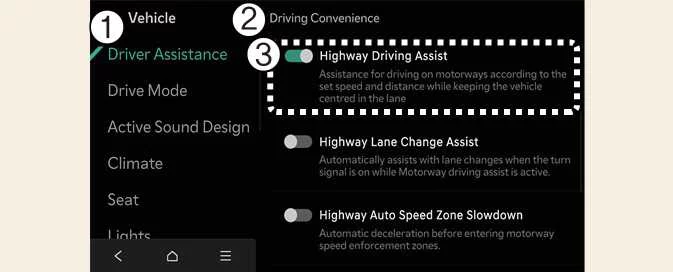
When the Kia EV6 is in DRIVE READY mode, tap Setup > Vehicle > Driver Assistance > Driving Convenience on the infotainment system screen to set the available options for each related function.
-
When Highway Driving Assist is selected, the system helps maintain distance from the vehicle ahead, maintain the set speed, and keep the Kia EV6 centered in the lane while driving on supported highways.
Highway Lane Change Assist: (if equipped)
|
|
-
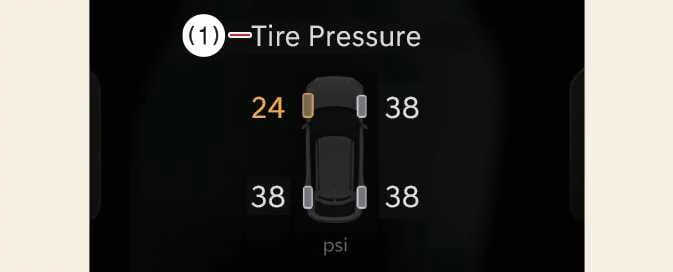
If Highway Lane Change Assist is selected, the function can help the Kia EV6 change lanes more smoothly and safely when all required conditions are satisfied.
WARNING
For your safety, change these settings only after parking the Kia EV6 in a safe location.
CAUTION
When using a Kia genuine Trailer Kit and the connector is plugged into your vehicle, Highway Driving Assist automatically turns OFF. In this condition, Highway Driving Assist will not provide assistance, so pay extra attention while driving. A Kia genuine Trailer Kit can determine whether a trailer is connected to the Kia EV6.
NOTE
-
To use Highway Lane Change Assist, Highway Driving Assist must first be active.
-
If there is a problem with these functions, the settings may not be changed. Have the function inspected by an authorized Kia dealer.
-
If the Kia EV6 is restarted, the functions maintain the most recent setting that was previously selected.
Warning Methods
|
|
|
The Warning Methods can be adjusted while the Kia EV6 is turned on. Select Setup >
Vehicle > Driver Assistance >  (Warning
Methods)
from
the infotainment system settings menu to change the following options:
(Warning
Methods)
from
the infotainment system settings menu to change the following options:
-
Warning Volume: Adjusts the volume level of the warning sound. Even if Warning Volume is turned OFF, the Kia EV6 may still provide a low-volume warning for safety.
-
Driving Safety Priority: Lowers the volume of other audio sources when a Driving Safety system warning is activated.
TIP
-
Your Warning Methods settings may also apply to the warning behavior of other Kia EV6 driver assistance systems.
-
Warning Methods keep their most recent settings when the vehicle is turned OFF and restarted.
-
The Warning Methods settings menu may not be available on all Kia EV6 models, markets, or equipment configurations.


Other information:
Kia EV6 2022-2026 Owner's Manual: Resetting integrated memory system
Stop the vehicle and open the driver’s door while the EV button is in the DRIVE READY position and the gear selector is in P (Park). Move the driver’s seat and seatback fully forward to the maximum forward position. Press memory button 1 (or 2) while simultaneously pushing the driver’s seat adjustment switch forward for more than 2 seconds.Kia EV6 2022-2026 Owner's Manual: Blind-spot Collision-avoidance Assist (BCA) : (if equipped)
The Kia EV6 Blind-Spot Collision-Avoidance Assist (BCA) system is designed to help improve driving safety by detecting vehicles approaching within the driver’s blind spot zones. If the Kia EV6 detects a potential collision risk in the blind spot area, the system can warn the driver using visual indicators in the side mirrors, audible alerts, and steering wheel vibration warnings.
Contents
Categories
- Manuals Home
- Kia EV6 Owners Manual
- Questions & Answers
- Video Guides
- Useful Resources
- New on site
- Most important about Kia EV6
- Privacy Policy
