
Kia EV6: Driver adjustments / LCD display
Kia EV6 2022-2026 Owner's Manual / Driver adjustments / LCD display
Contents:
Changing LCD display modes
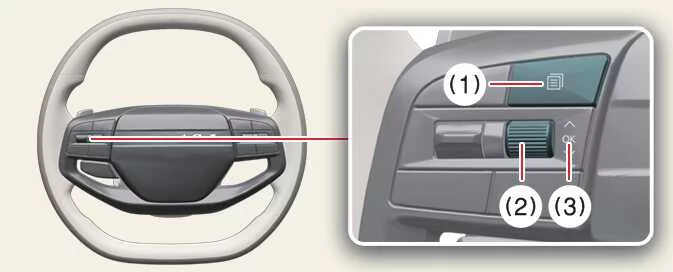
|
|
Switch |
Control |
Action |
|---|---|---|
|
Mode (1) ( |
Short Press |
Switches between different LCD display view modes. |
|
Up/Down (2)
|
Short Roll |
Searches and scrolls through utility and driving information. |
|
OK (3) |
Short Press |
Activates or confirms additional functions and menu items. |
|
Long Press |
Resets displayed menu information or trip data. |
 )
) ,
, 
LCD display modes ➤


Other information:
This warning light appears under the following conditions: When the EV button is switched to the POWER ON or DRIVE READY position. The Kia EV6 service warning light illuminates for approximately 3 seconds as part of the normal system self-check process and then turns off automatically. When the Kia EV6 detects a malfunction related to the electric vehicle control system, including sensors, control modules, or other EV-related electronic components.When the lighting control switch of the Kia EV6 is placed in the parking light position, the taillights, license plate lights, position lamps, and instrument panel illumination automatically turn ON. This lighting mode improves vehicle visibility during nighttime parking, low-light driving conditions, or situations where full headlamp illumination is not required.
Contents
Categories
- Manuals Home
- Kia EV6 Owners Manual
- Questions & Answers
- Video Guides
- Useful Resources
- New on site
- Most important about Kia EV6
- Privacy Policy

Copyright В© 2026 Kia EV6 Manuals вЏ± 0.0112