
Kia EV6: Controls and features / Storage compartments
Contents:
The Kia EV6 includes multiple storage compartments designed to conveniently store small personal items and everyday accessories for both the driver and passengers.
-
To help prevent theft, never leave valuables visible inside the Kia EV6 storage compartments.
-
Always keep storage compartment covers securely closed while driving. Do not overload the Kia EV6 storage areas with excessive items that prevent the covers from closing properly.
WARNING
Flammable Materials
Do not store eyeglasses, lighters, portable batteries, aerosol spray cans, propane cylinders, cosmetic containers, canned beverages, or other flammable or explosive materials inside the Kia EV6 cabin. High temperatures inside the vehicle may cause these items to ignite or explode.
Center console storage
|
-
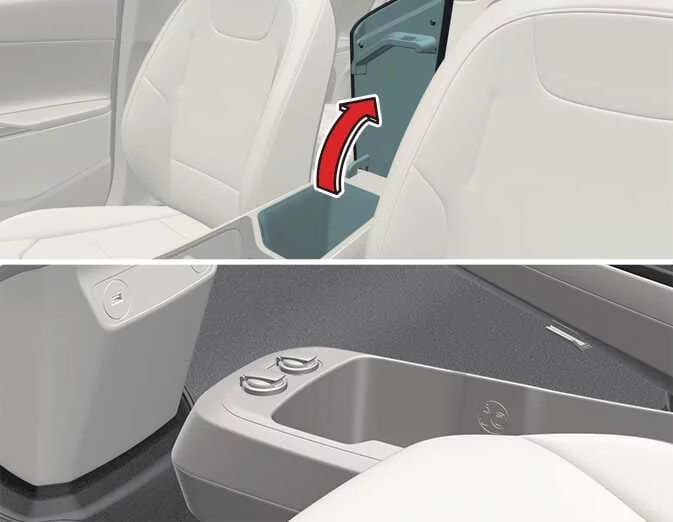
Lift the cover upward to open the Kia EV6 center console storage compartment. When closed, the center console can also be used comfortably as an armrest.
-
The lower section of the Kia EV6 center console includes an additional open storage area for quick access items.
Glove box
|
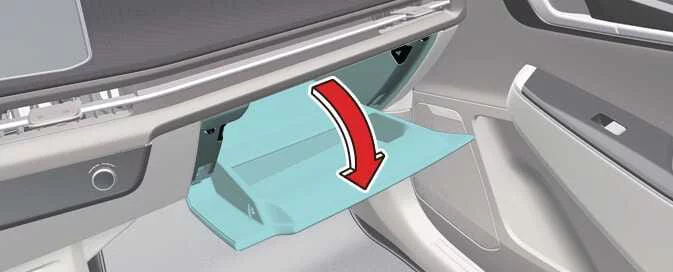
To open the Kia EV6 glove box:
-
Press the release lever and the glove box compartment opens automatically.
Always close the Kia EV6 glove box securely after use.
WARNING
Glove Box
To reduce the risk of injury during sudden stops or collisions, always keep the Kia EV6 glove box door closed while driving.
NOTE
If the Kia EV6 temperature control is set to a warm or hot position, heated air may flow into the glove box compartment.
Luggage board
|
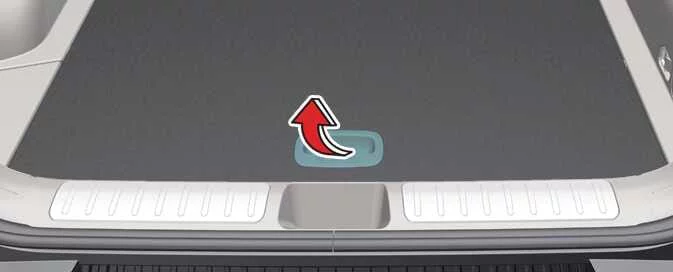
The Kia EV6 luggage board provides convenient storage space for tools, accessories, charging equipment, and small personal items.: (if equipped)
-
Lift the handle located at the edge of the cover to access the Kia EV6 luggage board storage area.


Other information:
Kia EV6 2022-2026 Owner's Manual: How to turn off Smart function while operating
Press the Parking/View button () during either of the following stages: Checking available exit space. Selecting the desired exit direction. Shift the transmission into R (Reverse) during either of the following stages: Checking available exit space. Selecting the exit direction.Kia EV6 2022-2026 Owner's Manual: Linking and unlinking profile
How to link user profile Open the infotainment settings menu and select Setup > User profile > Profile setting > Link Digital Key (Smartphone) to begin the Kia EV6 profile linking process. After selecting Link, the digital key associated with the registered smartphone number and its [Group] will connect to the chosen user profile.
Contents
Categories
- Manuals Home
- Kia EV6 Owners Manual
- Questions & Answers
- Video Guides
- Useful Resources
- New on site
- Most important about Kia EV6
- Privacy Policy
