
Kia EV6: EV menu / Charging and climate
Contents:
|
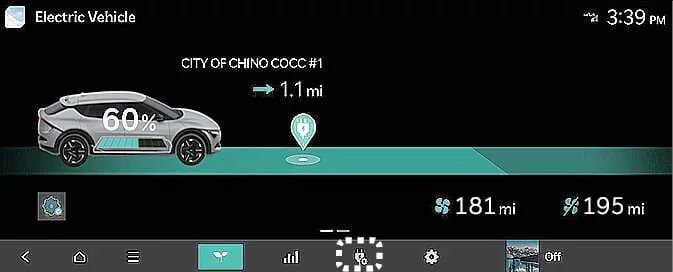
Tap the corresponding icon on the Kia EV6 infotainment screen to access Scheduled Charging and Target Temperature settings.
NOTE
To use scheduled charging features, the Kia EV6 must remain connected to a charging cable at the scheduled charging time.
|
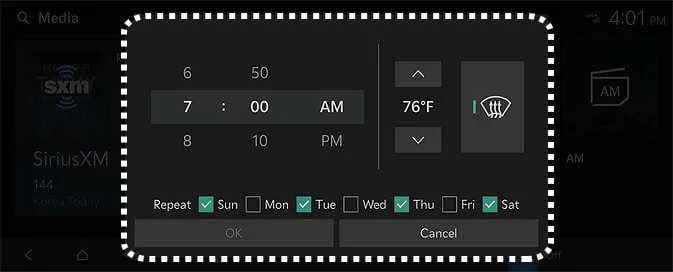
You can configure charging schedules, charging dates, charging times, and target cabin climate temperatures. The Kia EV6 also supports off-peak charging schedules to help reduce electricity costs.
Off-peak time settings
|
|
-
Select Start Time if you want the Kia EV6 to begin charging during the designated off-peak electricity period. Otherwise, charging begins at the scheduled charging time.
-
Configure the preferred charging strategy for reduced electricity costs:
-
Charge ONLY during Off-peak: Charging occurs only during the designated off-peak period and may not fully charge the battery to 100%.
-
Prioritize Off-peak Charging: Charging begins during off-peak hours and may continue after the off-peak period ends in order to fully charge the Kia EV6 battery.
-
Target temperature Settings
|
|
If you want the cabin temperature of the Kia EV6 to automatically adjust before departure, set the desired target temperature while the vehicle is connected to a charging cable. In cold weather, pre-scheduled cabin heating can improve comfort and optimize electric vehicle efficiency before driving.


Other information:
Kia EV6 2022-2026 Owner's Manual: Electronic stability control (ESC) operation
ESC ON condition When the EV button is switched to the POWER ON position, both the ESC and ESC OFF indicator lights illuminate for approximately 3 seconds before the Kia EV6 ESC system activates automatically. To deactivate the ESC system, press the ESC OFF button for at least half a second after switching the Kia EV6 into the POWER ON mode.Selecting the EV menu from the Kia EV6 infotainment home screen allows access to various electric vehicle management features, charging settings, energy monitoring functions, and battery-related information. TIP The Kia EV6 infotainment interface may change after software or navigation updates.
Contents
Categories
- Manuals Home
- Kia EV6 Owners Manual
- Questions & Answers
- Video Guides
- Useful Resources
- New on site
- Most important about Kia EV6
- Privacy Policy
