
Kia EV6: Switching between panels / Manual heating and air conditioning (A/C) operation
Contents:
The Kia EV6 heating and cooling system can also be operated manually by using the climate control buttons and knobs instead of the AUTO mode.
When manual mode is selected, the Kia EV6 climate system responds sequentially according to the order in which the buttons or control knobs are adjusted.
-
Start the Kia EV6 electric vehicle.
-
Select the desired air flow mode position.
For improved Kia EV6 heating and cooling performance:
-
Heating:

-
Cooling:

-
-
Adjust the Kia EV6 cabin temperature to the preferred setting.
-
Select the external fresh air intake mode.
-
Adjust the fan speed to the desired level.
If air conditioning is required, activate the Kia EV6 A/C system.
Press the AUTO button at any time to return the Kia EV6 climate control system to full automatic operation.
Mode selection
The Kia EV6 mode selection button controls the direction and distribution of air flow through the ventilation system.

|
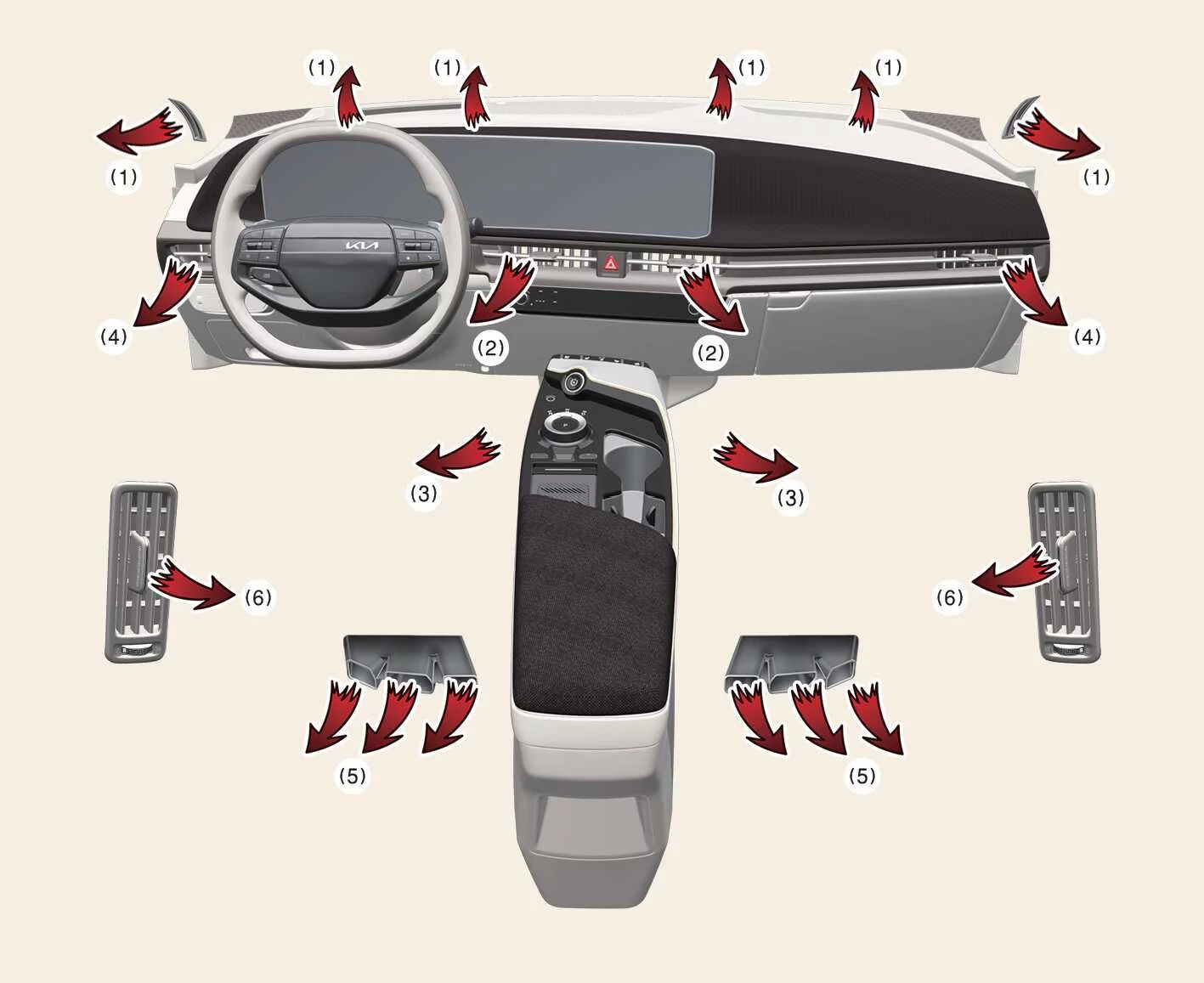
The Kia EV6 air flow outlet ports are directed as follows:

|
 Face-Level (2, 4, 6)
Air flow is directed toward the upper body and face area. The direction of air flow from each Kia EV6 vent can be adjusted individually for improved comfort.
 Bi-Level (2, 3, 4, 5, 6)
Air flow is distributed toward both the upper body and the floor area of the Kia EV6 cabin.
 Floor-Level (1, 3, 4, 5)
Most of the Kia EV6 air flow is directed toward the floor area, while a smaller amount of air is directed toward the windshield and side window defrosters.
 Floor/Defrost-Level (1, 3, 4, 5)
Most of the air flow is directed toward the floor and windshield, while a smaller amount is directed toward the side window defrosters for enhanced visibility.


Other information:
Kia EV6 (CV/CV1A) 2022-2026 Owner's Manual: Lane Keeping Assist (LKA)
The Kia EV6 Lane Keeping Assist (LKA) system is designed to help drivers maintain safer lane positioning during everyday driving. While driving above a certain speed, the Kia EV6 Lane Keeping Assist system can detect lane markings or road edges using the front view camera. If the Kia EV6 begins to leave its lane without the turn signal being activated, the system may provide visual and audible warnings and may assist with steering input to help prevent unintended lane departure.Kia EV6 (CV/CV1A) 2022-2026 Owner's Manual: How to turn off Smart function while operating
Press the Parking/View button () during either of the following stages: Checking available exit space. Selecting the desired exit direction. Shift the transmission into R (Reverse) during either of the following stages: Checking available exit space. Selecting the exit direction.
Contents
Categories
- Manuals Home
- Kia EV6 Owners Manual
- Kia EV6 Service Manual
- Questions & Answers
- Video Guides
- Useful Resources
- New on site
- Most important about Kia EV6
- Privacy Policy
